fp-l-tether
Open-source tethered shooting for the Sigma fp L on macOS
Sigma fp L のテザー撮影を macOS で動かすオープンソース実装
What it does
fp-l-tether is a self-contained tethering daemon and floating
control panel for the Sigma fp L on macOS. Shots land directly in Lightroom
Classic via Auto Import. Used daily by the author for studio product and
art-repro photography.
- Live View at 10 fps with click-to-AF on the LV image
- Detachable LV window (
⌘D) — pop Live View into a resizable 3:2 window for art-repro or iPad-via-Sidecar workflows - RGB histogram overlay with highlight / shadow clipping markers
- Composition grid — thirds / golden ratio / full alignment grid
- Floating control panel that follows you across macOS Spaces and Lightroom fullscreen
- Lightroom Classic Auto Import integration — every shot lands in your catalog automatically
- Auto USB recovery — when the fp L's bulk endpoint wedges (a known firmware quirk), the daemon force-re-enumerates the device via IOKit in ~4 seconds
- Persistent settings cache — ISO, shutter, aperture, white balance, format, and LV window state stay remembered across disconnects
- JPG / DNG / DNG+JPG capture with dual-file extraction
- Preferences window (
⌘,) — change watch folder, filename pattern, and Lightroom mode without editing TOML - 質実剛健 design — anodized-black + amber accent + SF Mono hero values, inspired by the Sigma fp's industrial aesthetic
Screenshots
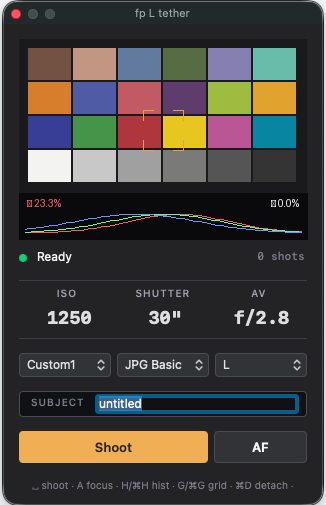
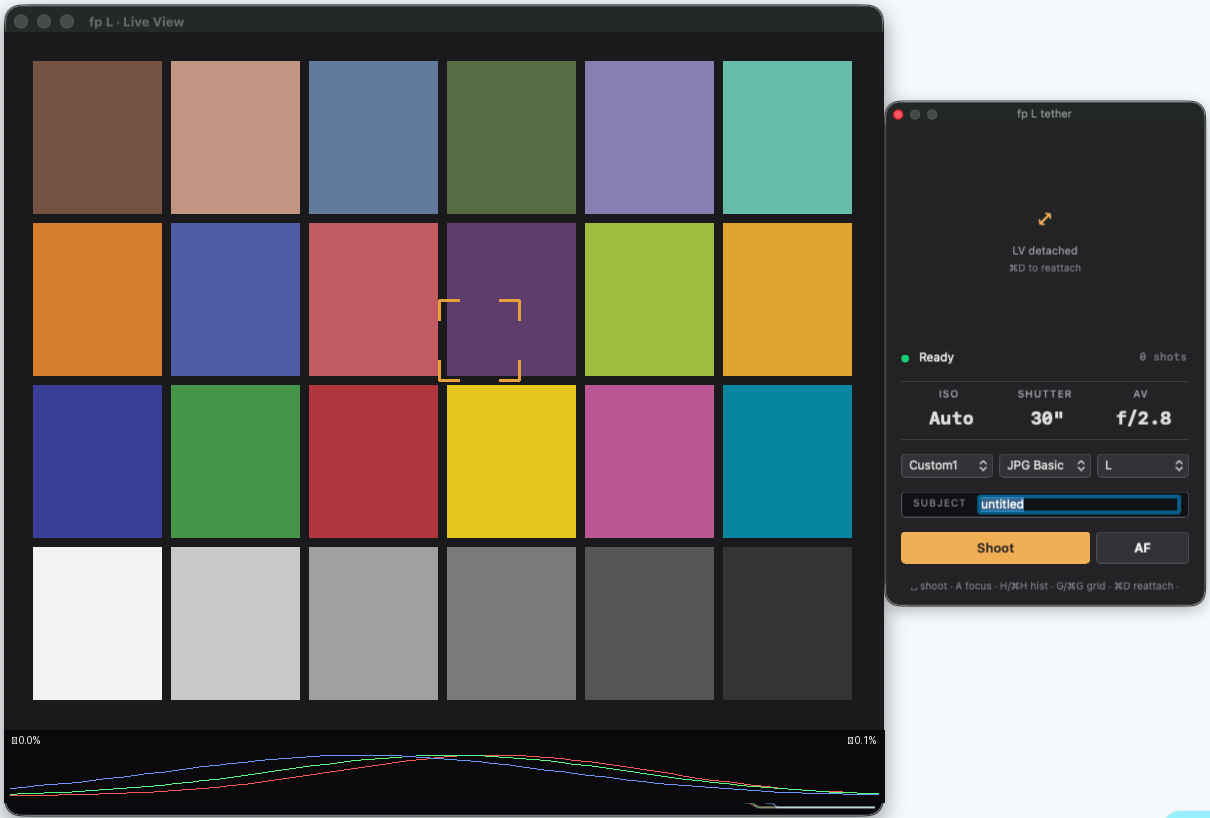
Quick start
git clone https://github.com/iochan-ship-it/fp-l-tether.git
cd fp-l-tether
python3 -m venv venv
source venv/bin/activate
pip install -e .
Connect the Sigma fp L in Camera Control USB mode, then:
# Kill macOS's built-in PTP daemon first
sudo killall ptpcamerad

# Launch the daemon + floating panel
sudo venv/bin/fp-l-tether start
sudo is required because libusb has to detach the kernel driver
from the camera's PTP interface. See docs/SETUP
for the full permission model.
What's working / not working
| Feature | Status |
|---|---|
| Capture (single shot, PC-triggered) | ✅ Works |
| Capture (camera-button-triggered) | ✅ Works |
| Live View (10 fps) | ✅ Works |
| Click-to-AF on Live View | ✅ Works |
| ISO / SS / Av / WB / Format / Resolution control | ✅ Works |
| Lightroom Auto Import | ✅ Works |
| Auto USB recovery from wedge | ✅ Works (~4 s) |
| Settings preservation across reconnects | ✅ Works |
| Detachable LV window + Sidecar (iPad as display) | ✅ Works |
| Burst / continuous capture | ⚠️ Single shot only — continuous on roadmap |
| Video / movie tether | ❌ Not supported, no plans |
| Linux / Windows | ❌ macOS only (IOKit-dependent recovery) |
Documentation
- Full README on GitHub
- SETUP — macOS, libusb, ptpcamerad notes
- LIGHTROOM — Lightroom Classic Auto Import setup
- TROUBLESHOOTING — common issues
Why this project
The Sigma fp L is a remarkable little camera that deserves a great tethered shooting experience. This is a community-built option for photographers who want their fp L shots to land directly in Lightroom Classic and who enjoy customizing their tools.
Acknowledgements
This work would not have been possible without:
- libgphoto2 (LGPL-2.1+) — PTP wire-protocol reference
- sigma-ptpy by makanikai — independent Python implementation cross-referenced for DataGroup FieldPresent bitmasks
- All the fp / fp L owners who posted USB captures and protocol notes on GitHub issues, Reddit r/SigmaFP, and DPReview over the years